
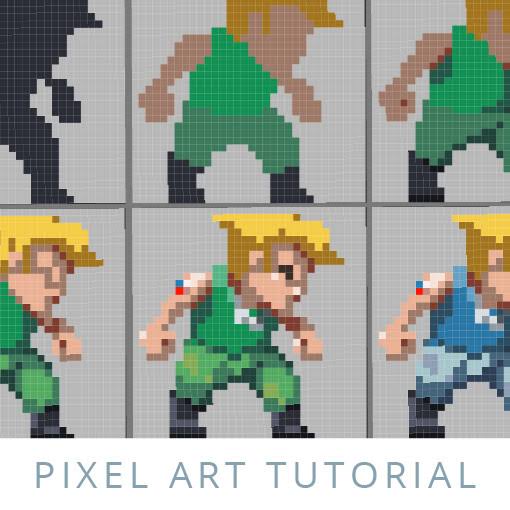
Pixel art is a timeless digital art form that combines creativity with precision, bringing retro aesthetics into modern designs. Whether you’re designing characters, landscapes, or game assets, mastering pixel art is both challenging and rewarding. Here’s how to get started!
Why Pixel Art?
Pixel art is more than just small squares—it’s a structured and intentional art style that thrives on simplicity and clever use of space. It’s popular in:
✅ Video game design – From indie games to AAA titles
✅ NFTs and digital collectibles – High-demand pixel-based artwork
✅ Social media content – Pixel animations and GIFs
✅ Custom digital assets – Icons, stickers, and profile pictures
Getting Started: Essential Tools
Before jumping in, here’s what you need:
🎨 Pixel-Friendly Software – Aseprite, Piskel, Photoshop, or Procreate
🖊️ Limited Color Palette – A few well-chosen colors create strong visuals
📏 Grid-Based Canvas – Choose sizes like 16×16, 32×32, or 64×64 pixels
🔎 Zoomed-In View – Work at a magnified level for precision
💡 Pro Tip: Begin with a small canvas! Tiny pixel art teaches shape control while keeping details manageable.
Step 1: Sketching Your Pixel Shape
Unlike traditional digital painting, pixel art relies on controlled placement of blocks. Start by creating basic shapes using single pixels.
Here’s an easy exercise:
- Select a small canvas (32×32 pixels)
- Draw a simple outline of an object (heart, star, tree)
- Refine the shape using clean edges
- Add color and shading for depth
🎨 Tip: Keep edges smooth by avoiding “jagged” pixel lines—straight diagonal strokes create better curves!
Step 2: Coloring & Shading for Depth
Pixel art shading doesn’t use smooth blending—it’s based on contrast and placement.
🎨 Dithering – Alternating pixels to create texture
🎨 Hue Shifting – Adjusting color temperature for more realism
🎨 Shadow Blocks – Using darker pixels to define depth
💡 Experiment with simple gradients—a lighter shade at the top and a darker tone at the bottom can create dimensionality.
Step 3: Adding Animation (Optional)
Pixel art animations are charming and bring artwork to life! Start with basic movement frames:
- Duplicate the base sprite
- Slightly adjust pixels for movement (eyes blinking, hands waving, objects bouncing)
- Test frame speed (12–24 FPS for smooth results)
💡 Even a small 4-frame animation makes a difference in visual appeal!
Final Thoughts: Small Pixels, Big Impact
Pixel art is a low-resolution powerhouse—an art style that thrives on simplicity, nostalgia, and clever detail. Whether you’re designing for games, personal projects, or creative branding, mastering pixels teaches control, design logic, and artistic discipline.
Ready to give it a shot? Open your digital canvas, drop in your first few pixels, and let your creativity unfold—one square at a time.
 Worldwide Art Advocacy